Online Barcode Scanner
On this page
Point your phone or laptop camera at a barcode, or upload a photo or screenshot of one, and the decoded value appears in a moment. The scanner reads retail codes (UPC, EAN), shipping and warehouse labels (Code 128, Code 39, ITF-14), and 2D codes (QR Code, Data Matrix, PDF417, Aztec). There is nothing to install, and your camera feed and images are processed in your browser, not uploaded.
How to scan a barcode online
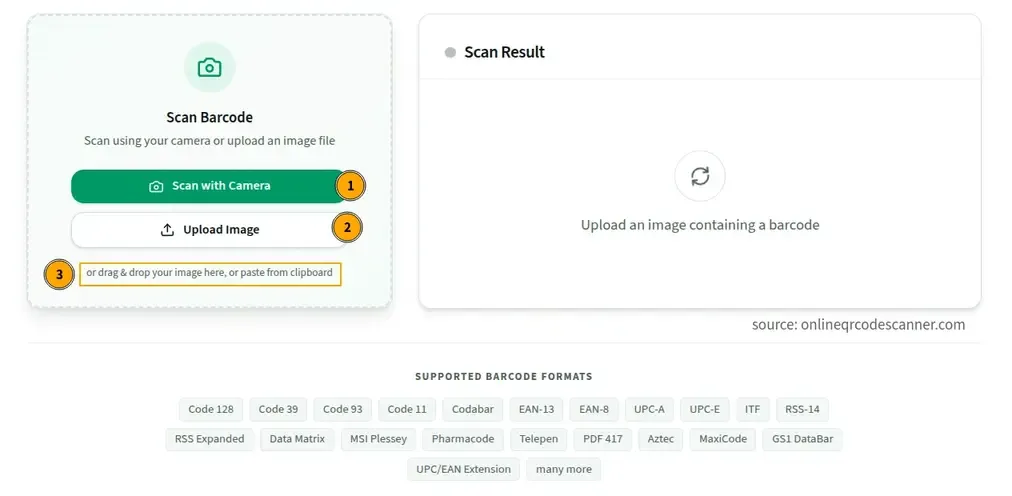
With your camera
- Click Scan with Camera and allow camera access when the browser asks.
- Hold the barcode flat in front of the lens and move back until the whole code is sharp.
- The result appears as soon as the code is read, and the camera stops.
This works with a phone camera or a laptop webcam. If you blocked camera access earlier, re-enable it in your browser’s site settings for this page.
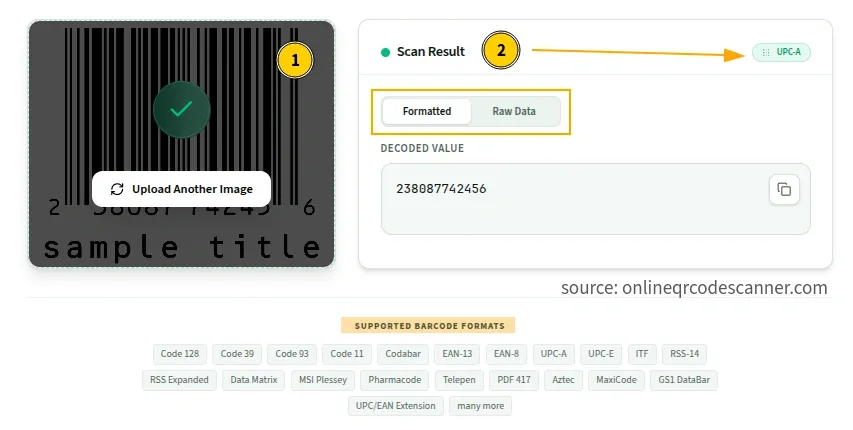
From an image or screenshot
Click Upload Image, or drag a file onto the upload area. PNG, JPG, and WebP files are supported.
Leave a little blank space around the barcode when you crop. That blank border, called the quiet zone, is how a scanner finds where the code starts and ends, and cropping into it is one of the most common reasons an upload fails. A photo where the barcode fills a good part of the frame also decodes more reliably than a wide shot where it is tiny.
From the clipboard
Copy a barcode image from a screenshot or another app, then press Ctrl+V (Windows, Linux) or Cmd+V (Mac) on this page. The image is read straight from the clipboard, so you don’t have to save a file first.
Barcodes inside a PDF
PDF files can’t be uploaded directly. Zoom in on the barcode, take a screenshot or export the page as a PNG, and upload that image.
Why won’t my barcode scan?
Most failures come down to the image, not the barcode.
- Glare. Glossy packaging reflects light into the lens. Tilt the package slightly until the shine moves off the code.
- Too close or out of focus. Many phones can’t focus closer than about 10 cm. If the preview looks blurry, move back.
- Scanning from another screen. Photographing a monitor often produces interference patterns that hide the bars. Take a screenshot and upload it instead.
- Curved or crumpled packaging. Bottles, cans, and bags distort the bars. Flatten the label or hold the camera square to the code.
- Cropped quiet zone. If you uploaded a cropped image, make sure the blank border around the code is still there.
- Poor print quality. Smeared ink, faded thermal paper, and low-contrast labels are hard to read. A 1D barcode has no error correction, so one damaged bar can be enough to stop it from reading.
- Tiny, dense 2D codes. A small Data Matrix on a component needs a sharp, high-resolution close-up. Uploading a good photo usually works better than a live camera feed.
- The browser itself. The built-in detector some browsers use supports a slightly different list of formats on each device. If a code won’t scan in one browser, try another.
What the barcode scanner shows, and what the numbers mean
A scanner reads the data stored in the barcode, nothing more. For a product barcode that data is a number, not a name or a price. The name and price live in the store’s or brand’s database, which this tool doesn’t query. If you want to know what a number belongs to, search for it on a marketplace or retailer site.
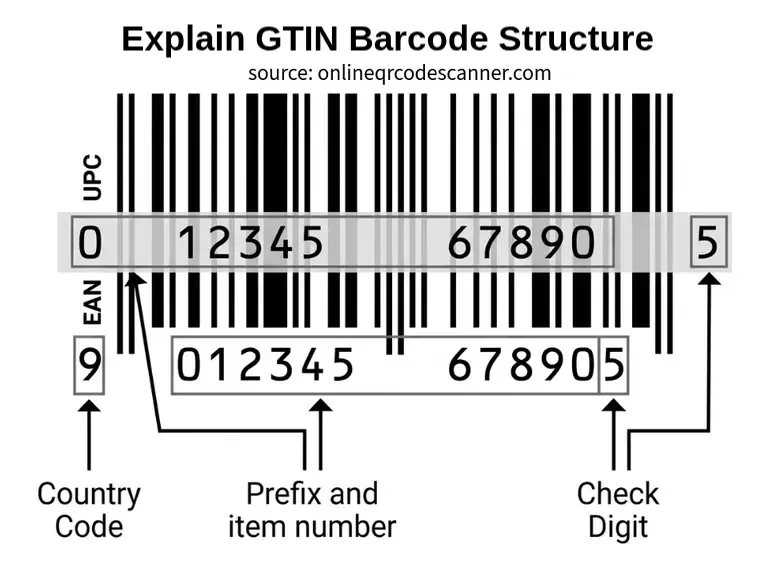
Retail barcodes carry a GTIN (Global Trade Item Number). GS1, the organization that manages the system, defines four lengths:
| GTIN | Digits | Barcode it appears in | Where |
|---|---|---|---|
| GTIN-8 | 8 | EAN-8 | Small items, mostly outside North America |
| GTIN-12 | 12 | UPC-A, UPC-E | Retail in the US and Canada |
| GTIN-13 | 13 | EAN-13 | Retail worldwide. Book ISBN-13 numbers start with 978 or 979 |
| GTIN-14 | 14 | ITF-14, Code 128 | Outer cartons, not meant for the checkout |
Why do I get 13 digits from a 12-digit UPC?
UPC-A is technically a subset of EAN-13, so some scanners report a UPC-A as an EAN-13 with a zero added at the front (MDN). It is the same product. Remove the leading zero to get the 12-digit UPC.
The last digit is a check digit
It lets scanners reject a misread. To calculate it, start at the rightmost digit before the check digit, multiply by 3, then 1, then 3, and so on across the number. Add the results, then subtract the sum from the next multiple of ten. For example, in 629104150021 the sum is 57, so the check digit is 3 and the full code is 6291041500213. GS1 publishes the manual method and a check digit calculator. Because of this safeguard, a smudged UPC or EAN is usually rejected, not read as a different valid number.
The first digits are not a country of origin
The prefix shows which GS1 member organization issued the number, not where the product was made.
Supported barcode formats by this tool
| Format | Type | Typical use | Standard |
|---|---|---|---|
| UPC-A | 1D, 12 digits | Retail in the US and Canada | ISO/IEC 15420 |
| UPC-E | 1D, compressed UPC-A | Small packages such as gum or lip balm | ISO/IEC 15420 |
| EAN-13 | 1D, 13 digits | Retail worldwide, books (ISBN) | ISO/IEC 15420 |
| EAN-8 | 1D, 8 digits | Very small items | ISO/IEC 15420 |
| Code 128 | 1D, full ASCII | Shipping labels, warehouses, GS1-128 | ISO/IEC 15417 |
| Code 39 | 1D, alphanumeric | Automotive, defense, ID badges | ISO/IEC 16388 |
| ITF-14 | 1D, 14 digits | Outer shipping cartons | ISO/IEC 16390 (ITF) |
| Codabar | 1D, numeric plus symbols | Libraries, blood banks, older systems | — |
| QR Code | 2D | URLs, payments, tickets, Wi-Fi, contacts | ISO/IEC 18004 |
| Data Matrix | 2D | Electronics, medicines, small parts | ISO/IEC 16022 |
| PDF417 | 2D, stacked | Driver’s licenses, boarding passes | ISO/IEC 15438 |
| Aztec | 2D | Rail tickets, mobile boarding passes | ISO/IEC 24778 |
A few details that help when you’re identifying a code:
- Code 128 vs Code 39. Code 128 packs the same data into a shorter barcode and has a built-in check character, which is why it dominates shipping and logistics. Code 39 is wider but still common where older specifications never changed.
- UPC-E squeezes a UPC-A down by dropping zeros, so the printed number looks shorter than 12 digits.
- Aztec codes have a square bullseye in the center and, unlike most 2D codes, don’t need a quiet zone.
- QR Code holds about 4,300 alphanumeric characters at the lowest error correction level. For URLs, Wi-Fi, vCards, and 2FA setup codes, our QR Code Scanner goes further and splits the content into readable fields.
The format list follows the symbologies in the browser’s Barcode Detection API, which MDN also documents with the related ISO standards.
1D vs 2D barcodes
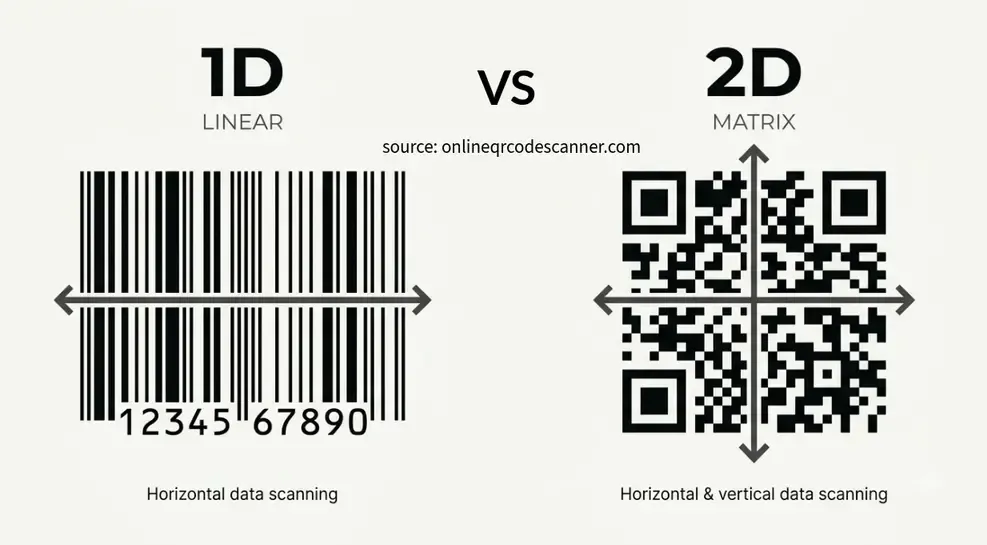
A 1D barcode stores data in the widths of parallel lines. It holds a short identifier, usually a number that points to a database record. A 2D barcode stores data in a grid, so it holds far more in less space and adds error correction.
Retail still runs mostly on 1D barcodes because checkout scanners were built for UPC and EAN, and an item only needs a 12 or 13 digit number to be looked up. That is starting to change. GS1’s Sunrise 2027 initiative is moving retail toward checkouts that can read 2D barcodes, such as QR codes that carry a GTIN, alongside traditional UPC and EAN barcodes. GS1 notes that brands don’t need to adopt everything by 2027, so you’ll see both kinds for years.
If you scan a QR code on a product and the result is a web address with /01/ followed by 14 digits, that is a GS1 Digital Link. The 01 marks the number that follows as the product’s GTIN.
When a barcode gets damaged, 2D wins. QR Code, Data Matrix, PDF417, and Aztec use Reed-Solomon error correction, which spreads redundant data across the grid. At the highest QR level (H), up to about 30% of the code can be missing and it still decodes. A 1D barcode has no such recovery, so a torn or smeared bar usually means a failed read. See GS1’s own comparison of 1D vs 2D barcodes.
Scanning IDs, boarding passes, and medicine packs
Some barcodes decode into raw text that looks cryptic at first.
- Driver’s licenses. The PDF417 on the back of US and Canadian licenses follows the AAMVA standard and holds the same details printed on the front, in a coded text layout.
- Boarding passes. Airline passes follow the IATA bar coded boarding pass format, usually as a PDF417, QR, or Aztec code. The text includes the passenger name, flight, seat, and booking reference.
- Medicine and medical packaging. Many carry a GS1 Data Matrix with the product number (identifier 01), expiry date (17), batch or lot (10), and serial number (21). Scanners often show these joined together without the brackets you see printed under the code.
These codes contain personal data. This scanner decodes them on your device and doesn’t send them anywhere, but avoid posting screenshots of a license or boarding pass online.
How the scanner works
Where the browser provides the built-in BarcodeDetector API, the scanner uses it. Support is limited: it is available in Chrome on Android, Samsung Internet, and Chrome on macOS and ChromeOS, and it is not available by default in Firefox or Safari. Everywhere else, including Windows and Linux desktop browsers, the scanner switches automatically to the ZXing JavaScript decoder. You don’t need to do anything, and the switch isn’t visible.
Privacy-Friendly Online Barcode Scanning
In the onlineqrcodescanner.com barcode scanner, camera frames are processed one at a time in your browser. They aren’t saved or sent to a server, and the camera stops once a code is found. Uploaded and pasted images are decoded locally too, so no network request is made and the image never leaves your device. Browsers only allow camera access on secure (HTTPS) pages, which this page uses.
Related tools
- QR Code Scanner: reads QR codes and splits Wi-Fi, vCard, Bitcoin, and 2FA content into readable fields
- QR Code Generator: create QR codes for URLs, Wi-Fi, contacts, SMS, email, and more
- YouTube QR Code Generator: turn any YouTube link into a scannable QR code
- Wi-Fi QR Code Generator: make a QR code guests can scan to join your network
Frequently Asked Questions
Can I scan a barcode with my phone without an app?
Yes. Open this page in your phone’s browser, tap Scan with Camera, and allow camera access. It works in most of the latest mobile and desktop browsers, and you can also upload a photo from your gallery.
How do I scan a barcode from an image or screenshot?
Use Upload Image, drag the file onto the page, or paste it with Ctrl+V or Cmd+V. PNG, JPG, and WebP files work. Keep the blank border around the barcode in the image.
Can I scan a barcode from a PDF?
Not directly. Take a screenshot of the barcode, or export the PDF page as an image, then upload it.
Why does the scanner show a different number than the one printed under the barcode?
The most common cause is a leading zero. A UPC-A read as an EAN-13 shows 13 digits instead of 12, and it is the same product. The other common cause is a package with several barcodes, so you’ve scanned a different one than you expected. UPC and EAN codes have a check digit, so a smudged print is normally rejected rather than misread as another number.
Does the scanner tell me what the product is or what it costs?
No. It reads the code and shows the value. Product names and prices come from a retailer’s or brand’s database. Search the number online if you need to identify the item.
What is the difference between a barcode scanner and a QR code scanner?
A QR code is one kind of barcode, and this scanner reads it along with the other formats above. The dedicated QR Code Scanner adds a step: it recognizes what the QR contains, such as Wi-Fi details or a contact card, and displays each field.
Does it work offline?
Decoding happens in your browser, so once the page has fully loaded it doesn’t need a connection to read a code. Opening a link that a code contains does need internet.
Does it work on iPhone, Android, and laptops?
Yes. Camera scanning and image upload work in current browsers on iPhone, Android, Windows, Mac, and Linux. If camera scanning doesn’t start, check that you allowed camera access for this site.
What file types can I upload?
PNG, JPG, SVG and WebP. Other formats aren’t supported.
Author

Abhishek
Software Engineer & Privacy Advocate
Abhishek is a software engineer and privacy advocate specializing in building fast, secure, and client-side utility applications. He focuses on creating browser-based tools that keep user data local and private.