QR Code Generator
On this page
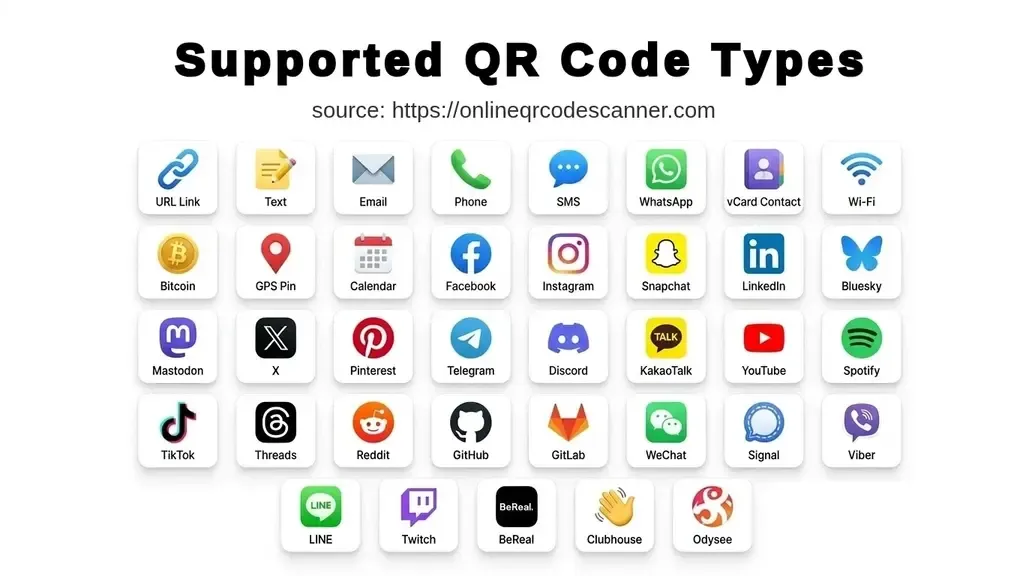
Create a QR code for a link, Wi-Fi network, contact card, message, payment address, location, event, or social profile, then download it as PNG, WEBP, or SVG. The generator offers 37 types: 11 core data formats plus tabs for 26 social, creator, and messaging platforms.
Everything runs in your browser. What you type is never uploaded, stored, or shared, so Wi-Fi passwords and contact details stay on your device.
What QR Code types this tool generates
Core data types (11 types):
URL, Text, E-mail, Phone, SMS, WhatsApp, vCard, Wi-Fi, Bitcoin, GPS, Calendar
Social media and video (13 platforms):
Facebook, Instagram, Snapchat, LinkedIn, X (Twitter), Pinterest, Threads, Reddit, Bluesky, Mastodon, YouTube, TikTok, BeReal
Developer and creator platforms (4 platforms):
GitHub, GitLab, Twitch, Odysee
Messaging and audio (9 platforms):
Telegram, Discord, Signal, Viber, KakaoTalk, WeChat, LINE, Clubhouse, Spotify
On any social or platform tab, enter a username or handle and the tool builds the correct profile URL and encodes it. You can also paste a full URL directly.
Which QR code type should I use?
| You want people to… | Use this type |
|---|---|
| Open a website, menu, or landing page | URL |
| Read a short message, coupon code, or instructions | Text |
| Write you an email with the subject filled in | |
| Call you in one tap | Phone |
| Send you a text message | SMS |
| Start a WhatsApp chat with you | |
| Save your contact details | vCard |
| Join your Wi-Fi without typing a password | Wi-Fi |
| Pay you in Bitcoin | Bitcoin |
| Find a location | GPS |
| Add an event to their calendar | Calendar |
| Follow or message you on a platform | The matching platform tab |
How to Create QR Code Online using this generator
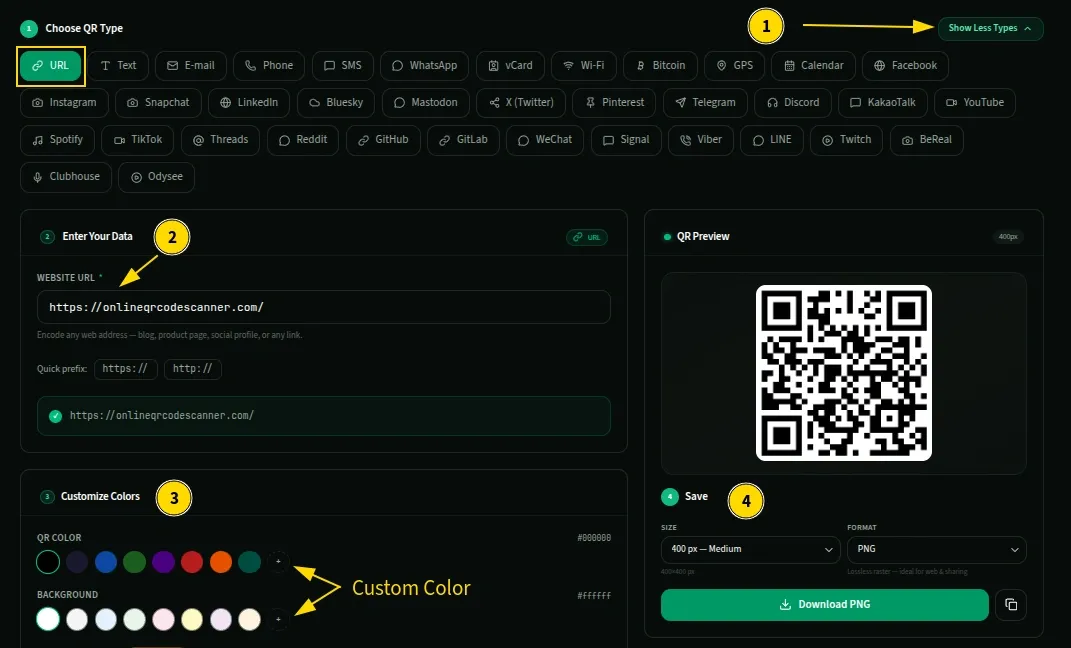
- Choose QR Type. Select the tab for what you want to create. The first 11 tabs cover core types like URL, text, and Wi-Fi. Click “Show more” to see all social media and messaging platforms.
- Enter Your Data. Fill in the fields for your selected type. The QR code generates and updates instantly as you type.
- Customize and Style. Change the pattern or background color using the palette presets or any custom hex code.
- Choose Size and Format. Pick your image resolution (128px to 1600px) and file format (PNG, WEBP, or SVG). A live preview lets you check the code before saving.
- Download or copy. Click Download to save your QR code file, or use the copy button to paste the image directly into another application.
Tip: Scan the code yourself before using it anywhere. It takes 10 seconds and catches typos and wrong URLs before they end up printed. You can copy the QR code and paste it into our QR Code Scanner to verify it.
QR code types explained
URL
Scanning opens the page in the phone’s browser, or in the matching app if the phone recognizes the link. It works for menus, product pages, event registrations, portfolios, and landing pages.
Start the link with https:// so every scanner treats it as a web address. Long links make dense patterns that are harder to scan, so for URLs over 100 characters, shorten them first with any URL shortner. To see which printed code brings visitors, add UTM parameters before encoding, for example ?utm_source=flyer&utm_medium=qr&utm_campaign=oct-sale. Your analytics tool will then show those visits as a separate source. See the URL QR Code Generator for more.
Text
Encodes a plain string. The phone shows the text directly, with no browser or app involved. Use it for coupon codes, reservation numbers, short instructions, or anything the person only needs to read. See the Text QR Code Generator.
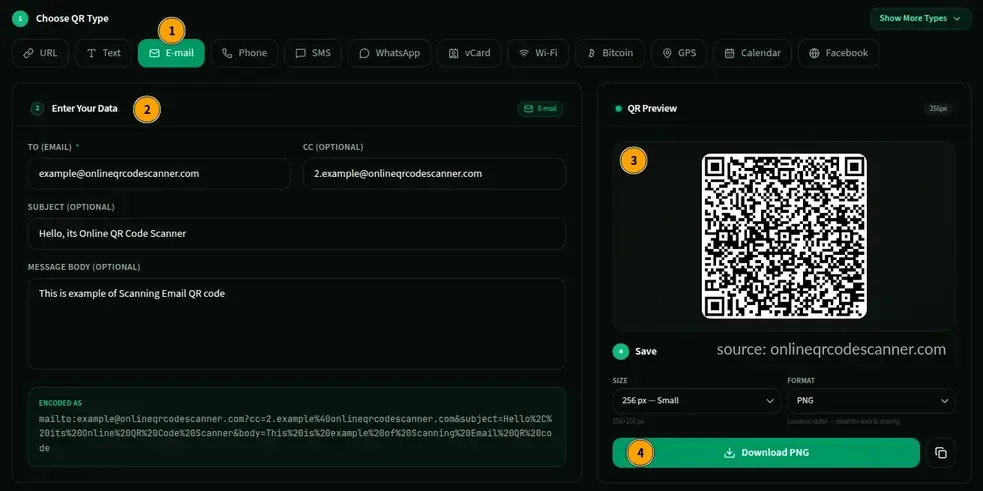
Generates a mailto: link with the recipient, subject, and body pre-filled. Scanning opens the default email app with the draft ready to send. Keep the pre-filled body short, because every extra character makes the pattern denser. See the Email QR Code Generator.
Phone
Encodes a tel: number, and scanning opens the dialer with the number entered. Include the country code (for example +91 or +1) so the number works from anywhere. See the Phone QR Code Generator.
SMS
Opens a text message draft with the number and an optional message already filled in, so the person only taps Send. How phones handle pre-filled messages can differ, so test the code on both an iPhone and an Android phone before printing. See the SMS QR Code Generator.
Encodes a wa.me link that opens a chat with a specific number and an optional pre-written message, without saving the number first. Enter the number in international format, without +, spaces, or dashes. See the WhatsApp QR Code Generator.
vCard
Encodes a full contact entry: name, phone, email, company, job title, website, and address. Scanning prompts the phone to save the contact in one tap. Each extra field makes the code denser, so include only what people need. A code with a name, one phone number, one email, and a website scans far more easily than one carrying every field. For a breakdown of every field, see the vCard QR Code Generator.
Wi-Fi
Encodes the network name (SSID), password, and security type. Scanning prompts the phone to join without anyone reading out a long password. It works through the built-in camera on iPhones with iOS 11 or later and on most phones with Android 10 or later.
Two things to know. First, the password is stored as plain text inside the code, not encrypted, so anyone who scans or decodes the image can read it. For a code displayed publicly, use a guest network with its own password. Second, network names or passwords containing ; , : \ or quotation marks need special handling inside the Wi-Fi format, so scan-test the finished code on a real phone before you print it. Details at the Wi-Fi QR Code Generator.
Bitcoin
Encodes a BIP-21 payment link: bitcoin:<address>?amount=<BTC>&label=<text>. When a wallet scans it, the address and amount fill in automatically, with the amount in BTC.
Bitcoin addresses are long strings of letters and numbers, and one wrong character sends funds to the wrong place with no way to reverse it. A QR code removes the risk of typing errors, but not the risk of encoding the wrong address, so check the address and send a small test payment first. See the Bitcoin QR Code Generator.
GPS
Encodes coordinates as a geo:latitude,longitude link. Scanning opens the location in the phone’s default maps app. Behavior can vary between devices, so if you need the same result on every phone, encode a Google Maps or Apple Maps link as a URL instead. See the GPS QR Code Generator.
Calendar
Encodes an event in iCalendar format: title, location, start and end time, and description. Scanning prompts the person to add it to their calendar. After generating, scan the code and check that the date, time, and time zone show correctly. See the Calendar Event QR Code Generator.
Social media and platform tabs
Every platform tab works the same way: enter a username or handle and the tool builds the profile URL, or paste a full URL yourself. Most platforms are obvious. These are the ones where you need something specific:
| Platform | What to enter |
|---|---|
| Mastodon | Your full handle, such as @user@instance.social |
| Spotify | The share link copied from the Spotify app |
| Discord | A server invite link. Invites can expire by default, so create one set to never expire |
| Signal | Your Signal profile link |
| Viber, WeChat, KakaoTalk, LINE | The share or add-contact link from inside the app |
Each dedicated generator page shows exactly where to copy the link. They are listed in the Related Tools section below.
Customization options
Colors
Choose any pattern and background color with the presets or a custom hex code. The one rule that matters is that the pattern must be darker than the background. Black on white is safest. Dark blue or dark green on a light background also works. Light grey on white will fail, and a pale pattern on a dark background can fail on older camera apps. If you use a brand color, test it on your phone before printing.
Size
PNG and WEBP exports range from 128px to 1600px. SVG has no size setting because it scales without losing quality.
- Web, email, slide decks: 256 to 300px
- Business cards and small printed items: 300 to 512px
- Flyers and posters: 512px or larger, or SVG
- Large-format signage and banners: SVG
Format
- PNG works everywhere and is the safe default for web use, stickers, flyers, and business cards.
- WEBP produces smaller files and suits websites, newsletters, and apps.
- SVG is a vector format that scales to any size without pixelation. Use it for banners, posters, signage, merchandise, or anything a printer will size.
Do not use JPEG for QR codes. JPEG compression softens the pattern edges, and the code can look fine on screen but fail on a scanner.
QR code error correction levels
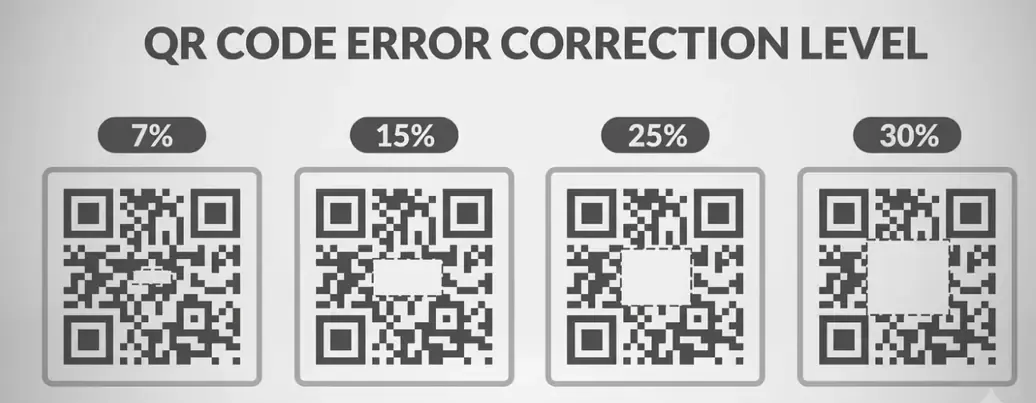
Error correction controls how much of the pattern can be damaged or covered while the code still scans. There are four levels: L (7%), M (15%), Q (25%), and H (30%).
The tool picks the level from the length of your data:
- Under 100 characters: Level Q (25% tolerance)
- 100 to 500 characters: Level M (15% tolerance)
- Over 500 characters: Level L (7% tolerance, so the pattern does not become too dense to scan)
You do not need to set this yourself.
Static QR codes vs dynamic QR codes
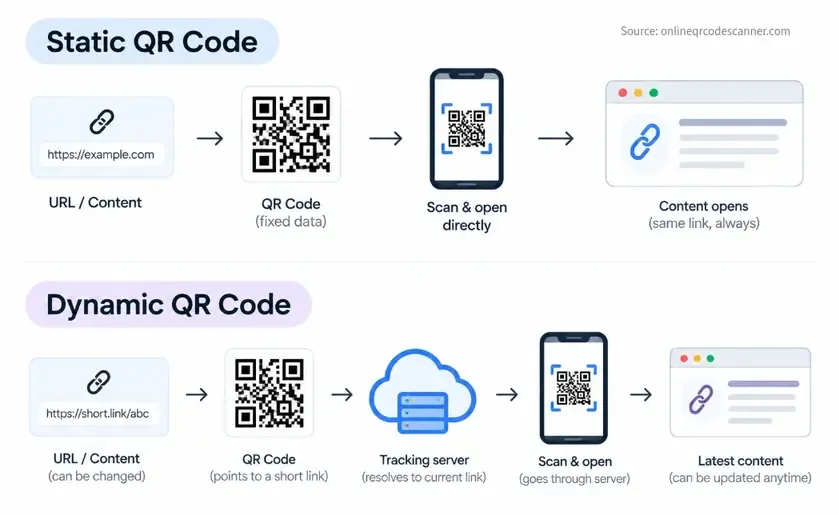
This tool generates static QR codes. The data is built directly into the pattern, so if the URL changes or there is a typo, you need to generate a new code.
Dynamic QR codes encode a short redirect link hosted by a third-party service. You can change the destination from their dashboard after printing and see scan analytics, usually with a paid subscription.
Dynamic codes are popular in marketing because the destination can change after printing. In Bitly’s 2025 marketer survey, 69% of respondents said they update or redirect dynamic codes at least monthly, while 14% rarely or never do (Bitly). That is a vendor survey of marketers, so it shows how marketers work, not how most people use QR codes.
For most uses a static code is simpler, and it never depends on anyone else. A dynamic code stops working if the provider shuts down or your subscription lapses. If you may need to change the destination later, create a short link at Bitly, Short.io, or Dub.co first, then encode that short link here. You can change where the short link points while the printed code stays the same.
Static codes have no scan counts of their own. To measure them, use a UTM-tagged link as described in the URL section above, or a short-link service with click stats.
Print sizing
The minimum practical printed size is 25mm x 25mm. At that size, modern phones scan reliably from about 20 to 30 cm away. Below 25mm, older phones and poor lighting start to cause failures.
For scanning from a distance, use the 10:1 rule: the code should be at least one tenth of the scanning distance. A poster scanned from 2 meters needs a code at least 20cm wide. A code on a table at arm’s length (about 50cm) can be 5 to 8cm wide.
Leave a blank margin of about four squares around the code, and do not crop it, stretch it, or invert its colors. For print, export SVG and let the designer or print service set the physical size. If you use PNG, export it at about 300 pixels per inch of printed width. A 512px PNG looks fine at 5cm wide but blurry at 20cm.
Research and context
QR codes were developed in 1994 by Denso Wave to track automotive parts. The format is now standardized as ISO/IEC 18004, which defines the structure, encoding, and error correction levels every QR code uses.
Everyday use grew quickly in 2020 and 2021, when businesses adopted contactless menus and information, and it stayed popular after Apple and Google built QR scanning into their phone cameras. Statista’s survey data shows that the number of U.S. smartphone users scanning QR codes rose between 2020 and 2022, with a projection above 100 million by 2025 (Statista). Consumer research from TEAM LEWIS, as summarized by Bitly, found that people most often scan for restaurant menus, product information, apps, Wi-Fi access, and event tickets. Those are the same jobs the URL, Wi-Fi, and vCard types in this tool are built for.
Related tools
Core data types
- URL QR Code Generator
- Text QR Code Generator
- Email QR Code Generator
- Phone QR Code Generator
- SMS QR Code Generator
- WhatsApp QR Code Generator
- vCard QR Code Generator
- Wi-Fi QR Code Generator
- Bitcoin QR Code Generator
- GPS QR Code Generator
- Calendar Event QR Code Generator
Social and video
- Facebook QR Code Generator
- Instagram QR Code Generator
- Snapchat QR Code Generator
- LinkedIn QR Code Generator
- X (Twitter) QR Code Generator
- Pinterest QR Code Generator
- Threads QR Code Generator
- Reddit QR Code Generator
- Bluesky QR Code Generator
- Mastodon QR Code Generator
- YouTube QR Code Generator
- TikTok QR Code Generator
- Twitch QR Code Generator
- Spotify QR Code Generator
- Odysee QR Code Generator
- BeReal QR Code Generator
- Clubhouse QR Code Generator
- GitHub QR Code Generator
- GitLab QR Code Generator
Messaging
- Telegram QR Code Generator
- Discord QR Code Generator
- Signal QR Code Generator
- Viber QR Code Generator
- KakaoTalk QR Code Generator
- WeChat QR Code Generator
- LINE QR Code Generator
Scanner
Frequently Asked Questions
Is my data sent to any server?
No. Encoding runs in your browser using a JavaScript QR library. Nothing you type is transmitted or stored.
Do QR codes expire?
Static codes made here never expire, because the data lives in the image itself and not on a server. A URL code stops working only if the destination goes offline or the domain lapses.
Why does my printed QR code not scan?
The usual causes are printing it smaller than 25mm, low contrast between pattern and background, a JPEG export that softened the edges, a missing margin around the code, or a typo in the data. Fix those, keep the pattern dark on a light background, use PNG or SVG, and scan a test print before printing a batch.
What is the difference between PNG, WEBP, and SVG?
PNG works everywhere, WEBP gives smaller files for web use, and SVG scales to any size without blurring. Use SVG for print and PNG or WEBP for digital use. See the Format section above.
Can I customize the colors and still scan reliably?
Yes, as long as the pattern is darker than the background. Dark colors on a white or light background work well, and very light patterns will fail.
What QR type should I use for a restaurant menu?
URL. Encode the link to your online menu. You can update the menu itself at any time, as long as its web address stays the same. If you might move the menu to a new address, create a short link first and encode that instead of the direct URL.
Can I add a logo to the QR code?
Logo embedding is not supported yet, and we plan to add it. If you overlay a logo in an image editor, keep it small, about 10 to 15% of the code’s area at most, and only on codes with short data, which use a higher error correction level. Always scan-test the result. A large logo on a code with long data will break it.
What is error correction in QR codes?
It lets a code scan even when part of the pattern is dirty, damaged, or covered. The tool picks the level automatically from your data length. See the error correction section above.
What is the difference between a static and a dynamic QR code?
A static code holds the data directly and cannot be changed. A dynamic code points to a redirect link on a third-party service, so you can change the destination and see analytics, usually for a fee. See the section above.
Can I track how many people scan my code?
Not with the code alone, since static codes have no analytics. Encode a link with UTM parameters and check the traffic in your analytics tool, or encode a short link from a service that shows click counts.
Can I use this tool on a phone or tablet?
Yes. It runs in any modern browser on phones, tablets, and laptops, and you can generate, preview, and download codes without installing anything.
Author

Abhishek
Software Engineer & Privacy Advocate
Abhishek is a software engineer and privacy advocate specializing in building fast, secure, and client-side utility applications. He focuses on creating browser-based tools that keep user data local and private.