Online QR Code Scanner
On this page
Scan a QR code with your camera, upload a photo, or paste a screenshot, and see what is inside before you open anything. The scanner works out what kind of content the code holds and lays it out in plain fields: the network name and password for a Wi-Fi code, the name, phone, and email for a contact card, the full address for a link. The exact text stored in the code is always one click away on the Raw Data tab.
How to scan a QR code online
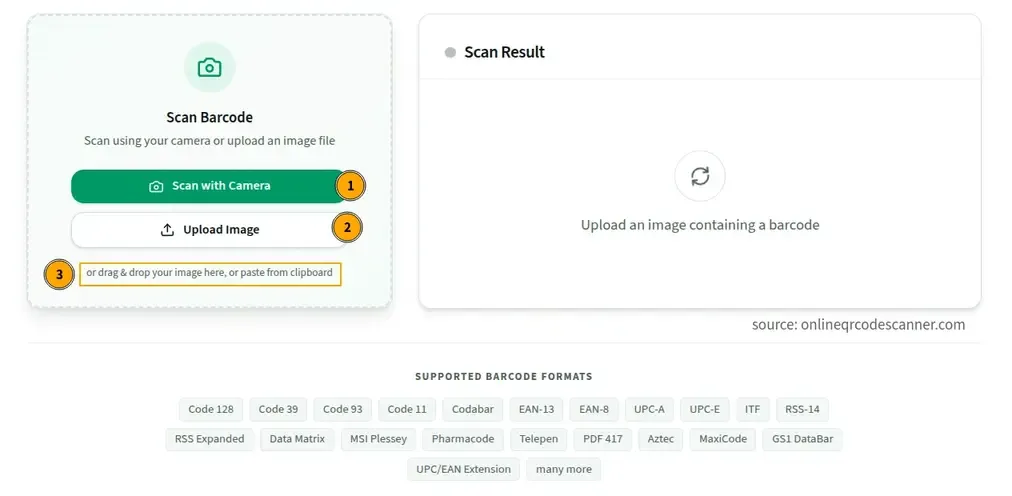
With your camera
- Click Scan with Camera and allow camera access when the browser asks.
- Hold the QR code inside the scanning frame. On phones the rear camera is used by default.
- The result appears automatically, with no button to press.
This works with a phone camera or a laptop webcam.
From an image or screenshot
Click Upload Image, or drag a file onto the upload area. PNG, JPG, and WebP files are supported. Uploads are tried at several zoom levels with contrast enhancement, so a small code inside a large photo usually still reads.
This is the easiest way to scan a QR code on a computer, since you can’t point a phone camera at your own screen. Take a screenshot of the code, then upload it.
From the clipboard
Copy a QR code image from a screenshot or another app, then press Ctrl+V (Windows, Linux) or Cmd+V (Mac) on this page. It’s read straight from the clipboard without saving a file first.
QR codes inside a PDF
PDF files can’t be uploaded directly. Zoom in on the code, take a screenshot, and upload the image.
What you see after scanning
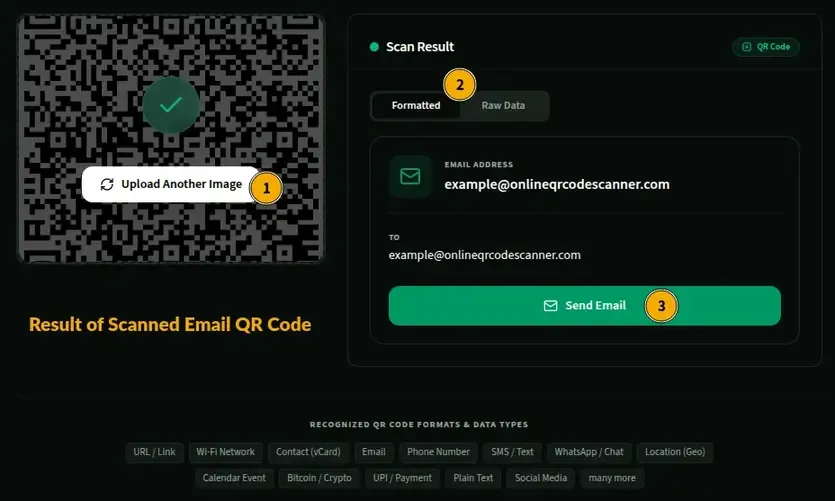
| The code contains | What the scanner shows |
|---|---|
| A website link | The full address with an Open button |
| Wi-Fi details | Network name (SSID), password, and security type (WPA/WPA2, WEP, or open) |
| A contact card (vCard) | Name, phone, email, organization, job title, address, website, and notes, with a Save Contact button that downloads a .vcf file |
| An email address | The recipient, with a button that opens your mail app |
| A phone number | The number, with a call button |
| An SMS | The recipient and any pre-written message |
| A WhatsApp link | A button that opens the chat |
| A Bitcoin address | The wallet address, plus any amount or label |
| Anything else | The decoded text, ready to read and copy |
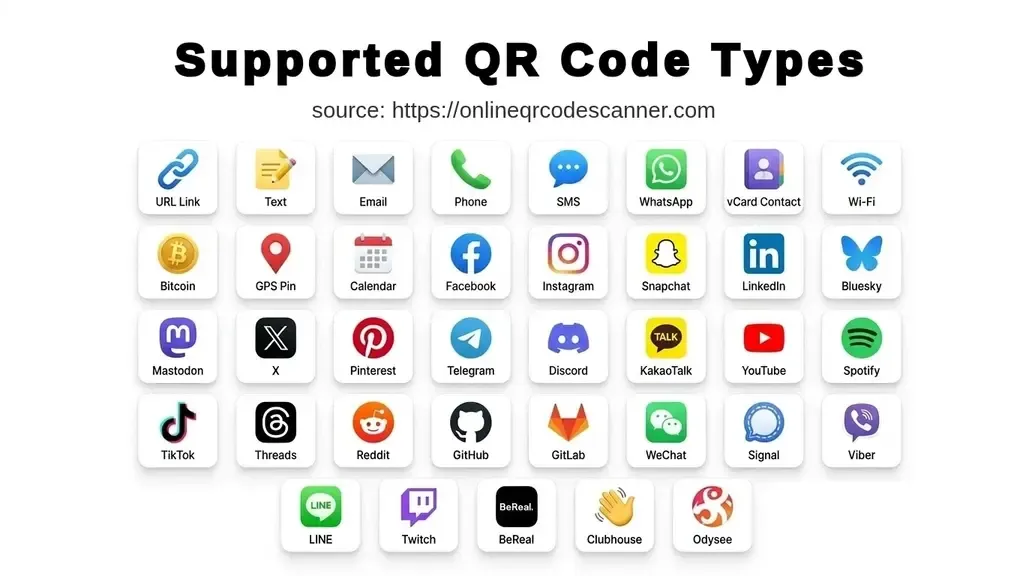
Other content types, such as locations (geo: links), calendar events, UPI payment links, two-factor setup codes, and app store links, appear as text you can read and copy.
The Formatted view splits recognized content into labeled rows. The Raw Data view shows the exact string stored in the QR pattern before any parsing, which is useful if you want to copy it, inspect an unusual code, or double-check the formatted view. Plain text codes have no formatted view because the text is already the final form.
Check a QR code before you open it
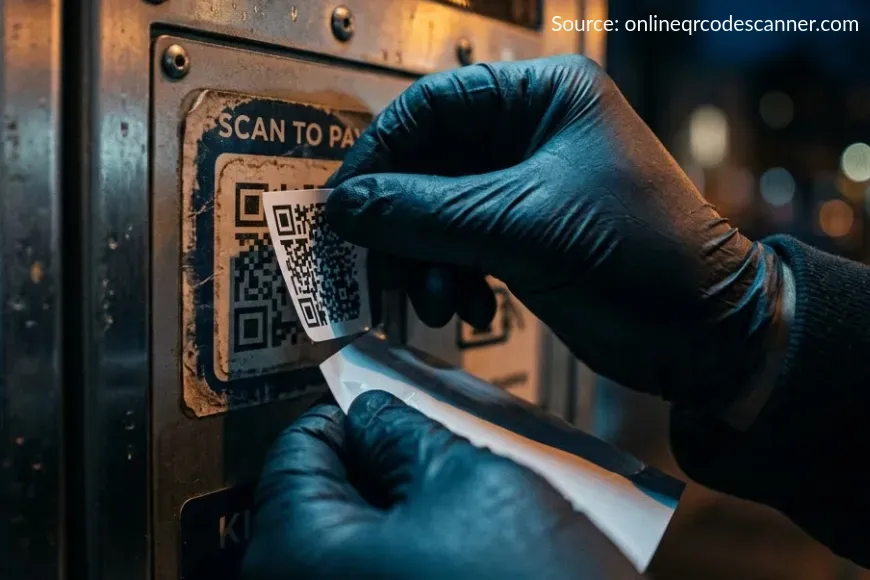
A QR code hides its destination until you open it, which is exactly what scammers rely on. The US Federal Trade Commission has warned about scammers placing their own QR codes over real ones, such as on parking meters, and sending codes by email or text with an urgent reason to scan. Its advice is to inspect the address before opening it, and not to scan codes in messages you weren’t expecting.
Because this scanner shows the content first, you can do that check safely:
- Read the domain carefully. The part that matters is the domain just before the first single
/. Look for misspellings, swapped letters, and extra words, such asyourbank-secure-login.example.com, which belongs toexample.com, not to your bank. - Be wary of shortened links. A shortened link hides where it goes. If you don’t trust the source, don’t open it.
- Look for
http://. Legitimate sites that handle logins and payments usehttps://. - Check payment codes. A UPI QR code starts with
upi://pay. The Raw Data tab shows the payee address (pa=), the name (pn=), and any amount (am=). To receive money you never need to scan a code or enter your UPI PIN, so a request to do that is a scam. - Treat two-factor setup codes like passwords. A code that starts with
otpauth://contains the secret key for your authenticator app. Anyone who has it can generate your login codes, so don’t share a screenshot of it. - Don’t trust a sticker. If a printed code sits on top of another one, or looks stuck on, don’t use it.
Why won’t my QR code scan?
- Camera permission blocked. If you declined the permission prompt or blocked the site earlier, the camera can’t start. The scanner shows how to reset the permission, and the upload option works without a camera.
- The page isn’t on HTTPS. Browsers only allow camera access on secure pages. On a plain HTTP page, use the upload option.
- Another app is using the camera. Close any video call or other tab that has the camera open, then try again.
- The code is too small or blurry. The scanner has to resolve the individual squares in the pattern. Move closer, hold the phone steady until it focuses, or upload a sharper photo.
- Glare or a screen. Shiny surfaces reflect light over the code, and photographing a monitor can add interference lines. Tilt the surface, or use a screenshot instead.
- Low contrast or a damaged code. QR codes are built to survive some damage. At the highest error correction level (H) about 30% of the code can be missing, and many codes use lower levels than that (Denso Wave). Beyond the limit, the data can’t be recovered. Very light colors on a light background are also hard to read.
- It’s a barcode, not a QR code. Product barcodes (UPC, EAN, Code 128) are read by the Barcode Scanner.
- Unsupported file type. Uploads must be PNG, SVG, JPG, or WebP.
Online QR Code Scanner vs your phone’s camera app
Your phone’s camera is a quick way to open a link, and many phones also offer to join a Wi-Fi network or add a contact straight from a scan. This scanner is useful when the camera app can’t help:
- You’re on a computer. You can scan a code from a screenshot, a saved image, or an email attachment.
- You want to look before acting. You see the whole address, the Wi-Fi password in plain text, or the raw string before anything opens or connects.
- You need to inspect unusual content. UPI links, two-factor setup codes, and full contact card fields are shown as readable text.
- You’d rather not install anything. It runs in the browser.
What QR codes this Scanner can read
The scanner reads standard QR codes in all 40 versions, from the smallest at 21×21 modules to the largest at 177×177 (Denso Wave, the company that invented QR codes). It reads both dark-on-light and light-on-dark codes. At the lowest error correction level, a single code can hold roughly 7,000 digits or 4,300 letters and numbers, and higher levels hold less.
How the Online QR Scanner works
Where the browser has the built-in BarcodeDetector API, the scanner uses it. Support is limited: it covers Chrome on Android, Samsung Internet, and Chrome on macOS and ChromeOS, but not Firefox or Safari by default. In those browsers, and on Windows and Linux desktops, the scanner automatically uses a JavaScript decoder instead. That decoder tries each camera frame as it is and again with the colors inverted, which is why light-on-dark codes work without changing any setting. MDN documents the detector in its Barcode Detection API guide.
How Your QR Code Data Stays Private
In the onlineqrcodescanner.com QR scanner, camera frames are processed one at a time in your browser. They aren’t saved or sent to a server, and when a code is found the camera stops and the stream is released. Uploaded and pasted images are decoded locally too, so no network request is made and the image stays on your device. The decoded result is kept in browser memory until you scan again or close the tab.
Related tools
- QR Code Generator: create QR codes for URLs, Wi-Fi, contacts, SMS, email, WhatsApp, Bitcoin, and more
- Wi-Fi QR Code Generator: make a QR code guests can scan to join your network
- vCard QR Code Generator: create a contact QR code for your business card
- URL QR Code Generator: turn any link into a scannable QR code
- Barcode Scanner: scan EAN-13, Code 128, and other 1D and 2D barcodes
Frequently Asked Questions
How do I scan a QR code on my computer?
Use a laptop webcam with Scan with Camera, or take a screenshot of the code and upload it, or paste it with Ctrl+V or Cmd+V. The screenshot method is the fastest for codes you received by email, chat, or on a web page.
Is it safe to scan a QR code from an unknown source?
Scanning is not the risky step, opening the link is. This scanner shows the address first so you can check it. Don’t open links from unexpected emails or texts, and read the domain for misspellings. See the section above.
How do I see the Wi-Fi password in a QR code?
Scan the code and look at the Wi-Fi result. It shows the network name, the password in plain text, and the security type. This is also why a Wi-Fi QR code shouldn’t be displayed publicly if the network matters to you.
How do I save a contact from a QR code?
Scan a contact card code and click Save Contact. It downloads a .vcf file that phones and contact apps can import.
Does it work on iPhone and Android?
Yes. Camera scanning and image upload work in current browsers on both. If the camera option doesn’t appear or permission is blocked, the upload option still works without camera access.
Does the scanner work offline?
Once the page has fully loaded, decoding happens in your browser and needs no connection. Opening a link from the result does need internet.
Can it read damaged or partly covered QR codes?
Sometimes. QR codes carry error correction that can restore the data if part of the pattern is dirty or missing, up to about 30% at the highest level. The contrast enhancement and multi-scale scanning on uploads help with low-quality images, but a code damaged beyond its limit can’t be recovered.
Can it read a QR code in an unusual color?
Yes. It tries the normal and inverted versions of every image, so light-on-dark and colored codes usually read. Very low contrast, such as light blue on white, may fail.
Why did the scanner find no QR code in my image?
Make sure the image really holds a QR code and not a product barcode. Check that the code is large enough to see the individual squares, that there is enough contrast against the background, and that the file is PNG, JPG, or WebP. Cropping the image to the code, with a small blank border left around it, usually fixes the problem.
What is the difference between qr scanner and the barcode scanner?
This tool reads QR codes and explains what is in them. The Barcode Scanner reads product and logistics barcodes such as EAN-13, UPC-A, Code 128, Code 39, PDF417, Data Matrix, and Aztec.
Author

Abhishek
Software Engineer & Privacy Advocate
Abhishek is a software engineer and privacy advocate specializing in building fast, secure, and client-side utility applications. He focuses on creating browser-based tools that keep user data local and private.